
Eagan Membership Info

.png)

where to login
Log in to the MEMBER PORTAL with this link, or by selecting the person icon at the top of our Buy Now page. Logging in can be done by sending a One Time Passcode to either your email or phone number that you used for your original purchase.

how to look up your entrance code
Your entrance code was sent to your email upon purchase.
-
The QR code in this email can be scanned at the door for entrance to Good Times Park.
-
The QR code can be added to your Apple Wallet or Google Wallet to make it easy to find and pull up for future use
-
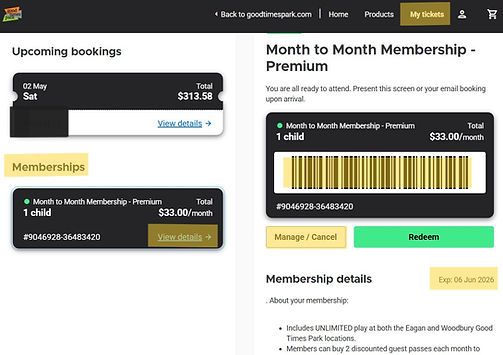
Alternatively your door bar code can be found on your membership portal by
-
Logging into the MEMBER PORTAL with your email address or phone number used to purchase the membership
-
Look under My Tickets
-
Find the membership and select View Details to see your bar code
-
Save a screen shot and keep it somewhere accessible for ease of access in the future
-
how to cancel a month to month membership
Recurring monthly memberships automatically continue with a recurring charge to the credit card on file, unless it is cancelled by the purchaser 3 days prior to the next bill date.
If you need to cancel your membership, you can do so by:
-
Logging into the MEMBER PORTAL with your email address or phone number used to purchase the membership
-
Look under My Tickets
-
Find the membership and select View Details to see your Membership
-
Select the Manage/Cancel button and follow the prompts to cancel
-
Upon cancellation you will receive a confirmation email and your membership will now show a Pending Cancellation status
-
Your access to Good Times Park will remain active until the next billing date
does the yearly membership auto-renew?
No. The yearly memberships expire one year from date of purchase/conversion.
how to Use your Premium Discounts
-
Log into the MEMBER PORTAL with your email address or phone number used to purchase the membership
-
Look under My Tickets
-
Find the membership and select View Details to see your membership
-
Click the green Redeem button and select Day Passes (Monthly Premium and Yearly Premium Memberships)
-
Discounts will be automatically applied at Checkout (2 discounted guest passes per child in your membership per month)
-
-
Or Select Party Packages (Yearly Premium Memberships only)
-
Discounts will be automatically applied at Checkout (1 discounted party per child in your membership per year)
-
how to update payment information
-
Log into the MEMBER PORTAL with your email address or phone number used to purchase the membership
-
Look under My Tickets
-
Find the membership and select View Details to see your Membership
-
Select the Manage/Cancel button and follow the prompts to update your payment information
how to change membership (i.e. # of children)
The number of children covered by a membership can be increased or decreased at any time by working directly with our staff. Please email us at support@goodtimespark.com or call 651.454.5736, Option 0 to obtain pricing & further details.
is my membership good at Eagan and woodbury?
It depends, Premium Memberships are good at both locations. Basic memberships are only good for one location.